
Surcharge Requirements for Merchants
Merchants intending to apply surcharges on credit card transactions must adhere to specific guidelines to ensure compliance with card network policies and applicable laws. Infinicept has created this resource to help merchants navigate surcharging requirements, but compliance requirements can change from time to time and it is the merchant’s responsibility to ensure they are aware of any change to card network rules or state laws. If you have any questions regarding these guidelines, our team is always available to help. Please reach out to risk@infinicept.com.
Signage and Disclosure Requirements
You are responsible for providing the following notices to consumers. You may be requested to provide evidence of physical signage placement and digital disclosures. Click here to download example verbiage for point-of-entry and point-of-sale notices.
Point-of-Entry Notice
Prior to entering a transaction, consumers must be made aware of the surcharge fee applied to credit card payments and that the surcharge amount is not greater than the cost of acceptance. This must be clearly displayed on signage at the point-of-entry.
- In-Store: Display signage with surcharge language at the point-of-entry.
- Online Store: Display surcharge language on the homepage of the website.

Point-of-Sale / Checkout Disclosure
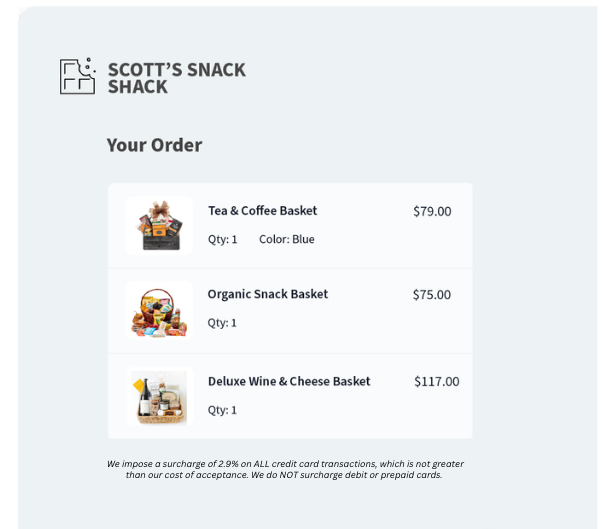
A separate and distinct disclosure must be provided to the consumer digitally via the POS terminal (or digital checkout page). The disclosure must indicate:
- the exact amount or percentage of the surcharge
- that the surcharge is not a transaction fee and is related to accepting a credit card
- that the surcharge is only applicable to credit card transactions
- that the merchant is imposing the surcharge
- In-Store: Provide the disclosure to the consumer digitally via the POS terminal.
- Online Store: Provide the disclosure to the consumer at checkout on the website.
Surcharge Checklist
Use this checklist to prepare your business for implementing surcharges.
1. Provide Clear Disclosures to Consumers
Disclosures are required in the form of signage in-store and on-screen at checkout. See the Software Requirements and Signage and Disclosure Requirements sections for more information.
2. Assess Legal Permissibility
Confirm that surcharges are legal in your state. As of now, certain U.S. states have laws prohibiting or restricting surcharges.
- California: prohibits surcharges on credit card transactions (7.1.24)
- Colorado: capped at 2%
- Connecticut: prohibits surcharges on credit card transactions
- Florida: likely prohibited – litigation probability
- Kansas: courts overturned the ban
- Maine: prohibits surcharges on credit card transactions
- Massachusetts: prohibits surcharges on credit card transactions
- New York: allows credit surcharges (2.11.24). Merchants must post the total price of credit card transactions including the surcharge, before checkout. The final price of a transaction that includes a surcharge cannot be greater than the advertised price.
- Oklahoma: allows credit surcharges, capped at 2% (11.1.25)
- Texas: likely prohibited – probability of lawsuit
- Puerto Rico: prohibits surcharges by merchants, but third-party payment processors may impose a surcharge, subject to requirements
3. Confirm Registration and Go-Live Date
Confirm with your gateway or software provider that you have registered with the card brands and notified your acquiring bank of your intent to surcharge during the application process. Please note that you are required to wait 30 days from your registration date before you can enable surcharges.
4. Limit Surcharges to Credit Cards
Ensure that surcharges are applied only to credit card transactions. Debit and prepaid card transactions must NOT be surcharged. Work with your gateway or software partner to ensure your software programmatically blocks debit and prepaid cards from being surcharged. See the next section, Software Requirements, for more information.
5. Provide Additional Payment Options
You must offer consumers multiple viable payment options for a given transaction, ensuring that a credit card payment is optional when a surcharge applies.
6. Cap Surcharge Amount
The surcharge must not exceed your cost of acceptance for the credit card nor exceed the merchant discount rate for the card type. The maximum surcharge cap is 3% in most states. Oklahoma and Colorado cap surcharges at 2%. Work with your gateway or software partner to ensure limits exist in your software for surcharges based on state guidelines. See the section, Software Requirements, for more information.
7. Maintain Consistency Across Card Brands
If you accept multiple credit card brands and choose to surcharge, apply surcharges uniformly across all brands to avoid brand discrimination.
8. Regularly Review Compliance
Stay updated on card network policies and state laws regarding surcharges, as regulations may change. Ensure ongoing adherence to all disclosure and surcharge amount requirements.
Software Requirements
You are responsible for ensuring that the software installed on your point-of-sale (POS) terminals fulfills the following requirements. Work with your gateway / software partner to achieve and maintain compliance with these items. You may be requested to provide evidence of these items present within your software.
Block Restricted States, Debit Cards, and Prepaid Cards
Applying a surcharge on credit card transactions is not permitted in all states. Ensure your software blocks restricted states accordingly.
Card network rules and the Durbin Amendment prohibit surcharges on debit and prepaid card transactions, regardless of whether the debit transaction is PIN or signature-based. Only credit card transactions may be surcharged. Payment terminals and software must:
- Identify card type (credit vs. debit), typically via use of BIN. Implementation may vary by provider.
- Prevent accidental surcharges on debit cards and prepaid cards (especially those routed through PIN-less debit networks)
Provide Additional Payment Options
Your software must support multiple viable payment options for a given transaction, ensuring that a credit card payment is optional when a surcharge applies.
Calculate Surcharge Caps and Retain Documentation
Your software must enforce surcharge limits. The surcharge must not exceed the merchant discount rate for the card type. The maximum surcharge cap is 3% in most states and 2% in Colorado. You must retain documentation, in physical or digital format, showing how the surcharge is calculated on the transaction.
Apply Surcharges Consistently Across Card Brands
Your software must surcharge all card brands equally unless you have a brand-specific exemption.
Provide Proper Disclosures
Your software must provide the following disclosures to consumers:
- Checkout notice: Clearly disclose the surcharge before the transaction is completed.
- Receipt itemization: Display the surcharge amount as a separate line item on the transaction receipt in the same font and size as other language on receipt (online or physical).